
What you get
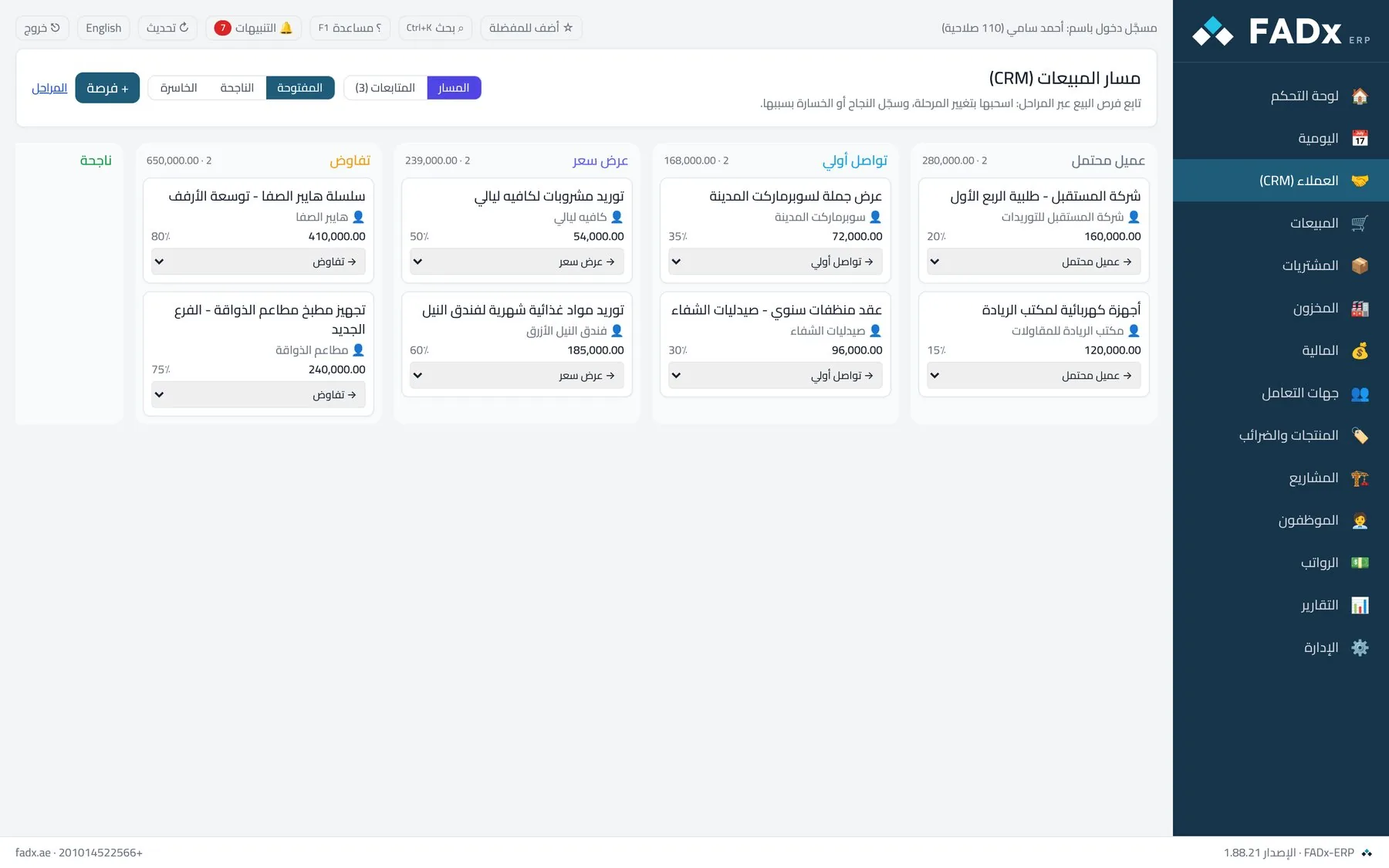
Sales pipeline
Opportunities as cards across stages: lead, contact, quotation, negotiation, won or lost. An opportunity moves between stages in one click.
Expected value and close rate
Every opportunity carries its customer, expected value and close probability — so you know the size of what you hold, not just the count.
Activities & follow-ups
A call, meeting, task or note — with a due date and status, tied to a customer or an opportunity. Overdue items show in a distinct colour with a count badge.
Reminders inside the software
Due follow-ups alert you inside the software itself — no external email, no extra subscription.
The 360° customer card
A customer’s opportunities and activities in one place beside their invoices, cheques and balances — the full picture on one screen.
Convert an opportunity to a sale
The “convert to sale” button moves a won opportunity to the won stage and takes you straight to creating the invoice, keeping its history.
Four reports
Pipeline value, win rate, loss reasons and overdue follow-ups — printable and exportable to Excel.
Separate permissions
The screen is gated by a view permission and editing by another — whoever lacks it never sees the screen at all.
In the product guide
The screens explained step by step with screenshots, and the messages you may see.
Other modules
Try it free on your own data
Request a free trial and we will set the system up on your own business, with your own data — not a demo dataset.