
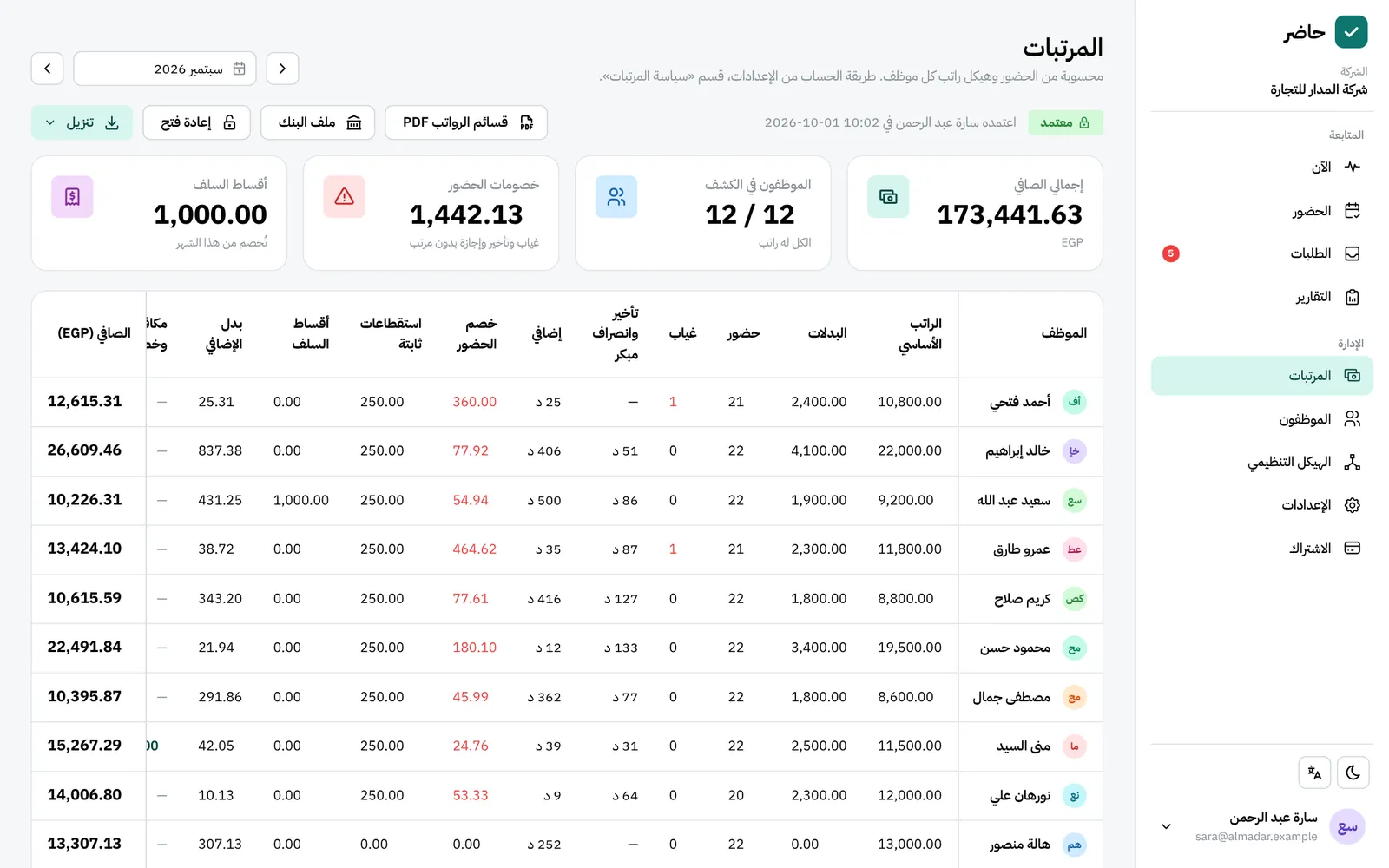
What you get
A salary structure, set once
Allowances such as housing and transport, and fixed deductions such as medical insurance, company-wide or for one person, as a monthly amount or a share of basic salary.
Raises with an effective date
“Change from a date” keeps earlier days at the old value, and an item that starts mid-month counts by its days.
Deductions and overtime from attendance
Absence, lateness and overtime follow attendance and your policy. Hourly staff are paid recorded hours × their rate, with no absence or lateness deductions.
Approval locks the month
Once approved, the numbers hold, and the month’s attendance, leave and holidays stay fixed until you reopen it.
Payslips and a bank file
PDF payslips in Arabic or English, together or one by one, the sheet in Excel, and a transfer file in your bank’s columns and order. IBANs are checked before saving: 29 characters in Egypt, 24 in Saudi Arabia.
Advances in automatic instalments
Equal instalments come off each month and show on the payslip (“advance instalment 2 of 6”); one the net pay can’t cover moves to the end of the schedule.
How it works
Full walkthrough in the guide- 1 Define salary items in Settings → “Salary items”, and your bank’s template in Settings → “Bank transfer files”.
- 2 Open “Payroll”, pick the month and review each employee’s calculation.
- 3 Add the month’s bonuses and deductions with notes, and defer an instalment or stop an advance that was paid in cash.
- 4 Approve the month to fix its numbers.
- 5 Download the PDF payslips, the payroll in Excel, and the bank file with its head count and total.
Common questions
Does Hader calculate social insurance and tax?
Not automatically yet. Record the employee’s insurance share as a fixed deduction in their salary items, and it comes off every month with the rest.
Who can see salaries?
An admin without the “view payroll” permission sees no salary, bank or ID number anywhere. Every look at salaries, payslips or the bank file is kept in the “Access log”.
Can employees see their payslips?
Yes, on “My pay”, once the month is approved, in the language of the screen, along with their salary structure, advances and instalment schedule.
Can I change payroll after approving the month?
Reopen the month first with “Reopen”, make the change and approve it again. That needs the permission to edit payroll and approve the month.
More in FADx Hader
Try Hader at your company
We activate a free trial account for your company and send you the sign-in link — your staff check in from a browser, a phone or a fingerprint terminal.