
What you get
Two rates per barber
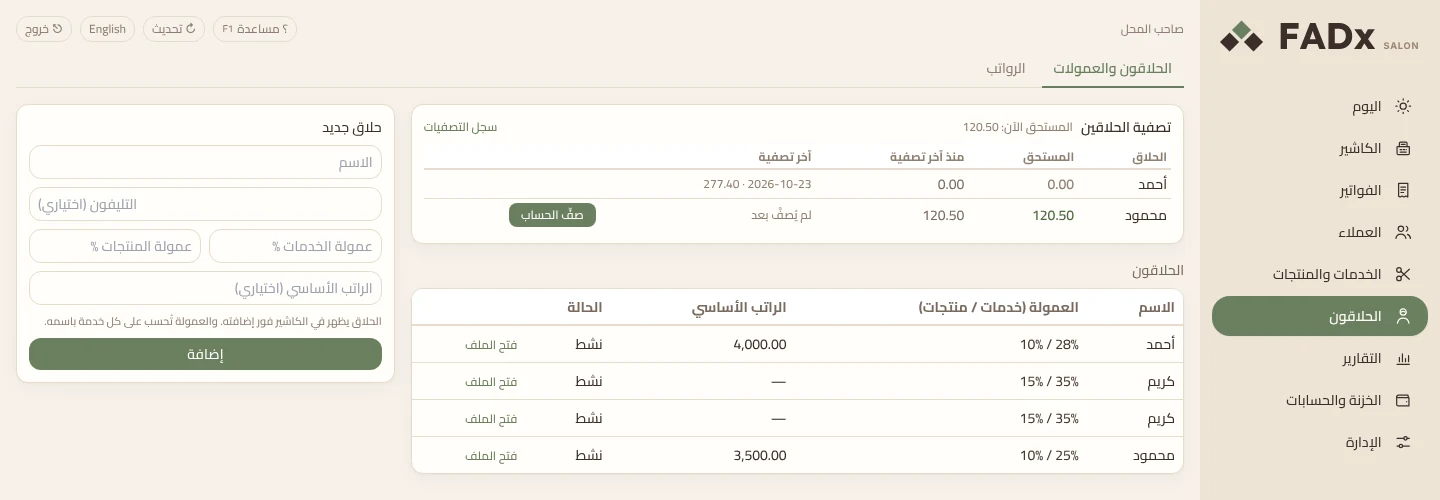
In the “New barber” form you enter a services commission % and a products commission %. The base salary is optional — leave it empty for a barber on commission only.
Commission that calculates itself
The barber is picked at the cashier, and every line sold under his name has its commission calculated automatically. If two barbers served one client, F10 changes the barber on the selected line alone.
Rate changes apply from today
Click a barber’s rate in the table and type the new one. It applies from today; earlier invoices keep the commission they already had.
Settle up from the till
The “Settle barbers” card shows, for each barber, what is owed now, what he has earned since the last settlement, and when that was. Press “Settle up”, then “Pay out”: the amount leaves the till and is recorded as an expense under “barber commissions”.
Never more than is owed
Partial payouts are allowed, and anything beyond what is owed is recorded as an advance from the barber’s file. An invoice voided after settlement has its commission taken off the next settlement alone.
A statement the barber can check
The “barber commission statement” goes to the barber with his settlement, listing every invoice number, service and commission. Commission is paid from the settlement, not the salary, so it is never paid twice.
How it works
Full walkthrough in the guide- 1 In “Barbers”, add the barber by name, enter the services and products commission % (say 30 and 10), then press “Add”.
- 2 At the cashier, pick him from the “Barber” list — every service added after that is recorded under him with its commission.
- 3 Follow commissions on the “Today” screen: the day’s total, and each barber’s visits, revenue and commission.
- 4 When it is time to pay, press “Settle up” in the barber’s row, and change the amount if you want to pay part of it.
- 5 Press “Pay out”, and print his “barber commission statement” from Reports so he can check it himself.
Common questions
How does the software work out a barber’s commission?
Each barber has a rate on services and a rate on products. Every line sold under his name at the cashier has its commission calculated automatically, and it shows on the “Today” screen and in the “Settle barbers” card.
If I change a barber’s rate, do old invoices change?
No. The new rate applies from today, and earlier invoices keep their commission.
Can I pay a barber part of his commission?
Yes. “Settle up” fills in the full amount owed, and you can change it to pay part. You can’t pay more than is owed: anything extra is an advance recorded from his file and deducted from his salary later.
Does it suit a barber on commission only?
Yes. The base salary is optional — leave it empty for a commission-only barber. Barbers on a salary are paid through the “Salaries” tab, separately from commission.